

TL;DR: You cannot search Tinder for a specific person by name. But there are still several ways to check if someone is on Tinder, including narrowing your Discovery settings, checking activity signals on an existing match, using Tinder Matchmaker through a friend, checking previously connected apps, and trying a reverse image search.
We cover what works for free, what you can do without a Tinder account, and which supposed Tinder search tools are not worth trusting.
Most people looking up how to know if someone is on Tinder have a specific person in mind. Maybe it is a partner. Maybe it is an ex. Maybe you have just started dating someone and want to know whether they are still using dating apps.
Tinder makes this harder than you might expect because there is no public directory of users.
Tinder introduced a Search feature in 2026 for some iOS users in select markets, but it is designed around interests and types of people. It specifically does not let you search for an individual by their name, age, or social media handle.
So if you are trying to find out if someone has Tinder, you still need to approach it indirectly.
Here are the methods that actually make sense in October 2026.
First, Understand How Tinder Visibility Works
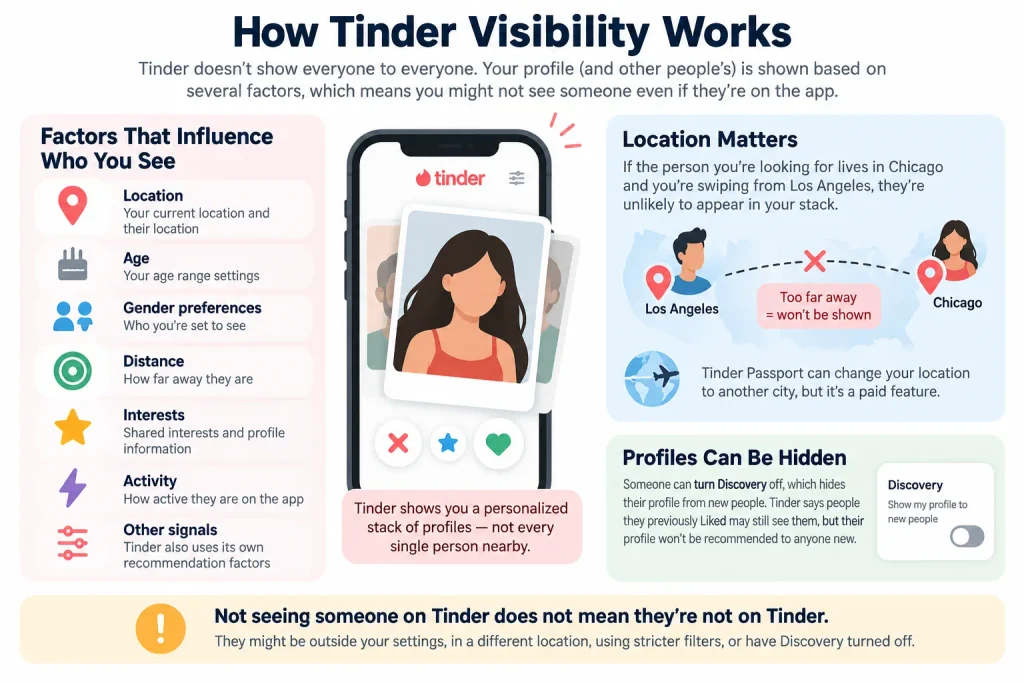
Before you start searching, understand that seeing someone’s profile is never guaranteed.
Tinder’s Discovery system considers things like location, age, gender preferences, distance, interests, activity, and other recommendation signals when deciding which profiles to show.
Your own Discovery settings control much of what appears in your stack. If you are trying to find someone specific, narrow those settings as closely as you reasonably can.
Location matters especially.
If the person lives in Chicago and you are swiping from Los Angeles, you are unlikely to come across them naturally. Tinder Passport can change your Tinder location to another city, but Passport is a paid feature.
There is another complication. Someone can also hide their profile by turning Discovery off. Tinder says people they previously Liked may still see them, but their profile will no longer be recommended to new people.
So not finding someone does not prove they are not on Tinder.
Method 1: Swipe Within Tinder With Narrow Discovery Settings
If you want to check if someone is on Tinder for free, this is still the most practical method.
You need your own Tinder account and should complete whatever profile setup Tinder requires in your region.
Then narrow your Discovery settings around the person you are looking for:
- Set your location as close to theirs as possible
- Narrow the age range around their age
- Adjust your distance range
- Make sure your gender and orientation settings would make their profile eligible to appear
- Start going through your recommendations
Do not expect them to appear immediately.
Tinder does not simply display every qualifying person in distance order. Recommendations are personalized, and Tinder may also show people slightly outside your chosen age or distance range unless you mark those preferences as dealbreakers.
If the person is nearby, currently visible in Discovery, and fits your settings, you have a reasonable chance of eventually seeing them. But there is no guarantee.
Can You Search for Someone by Name on Tinder?
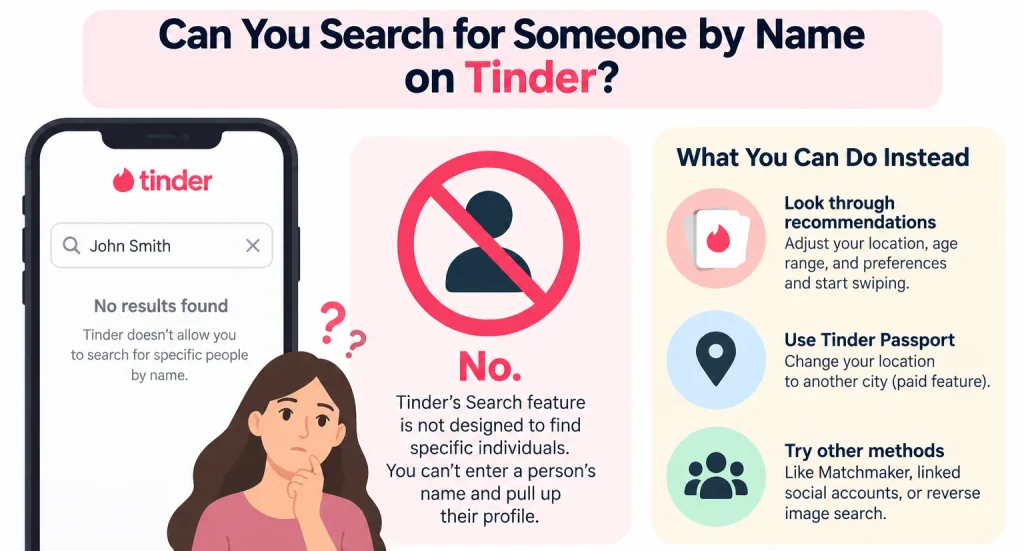
No. Even with Tinder’s newer Search feature, you cannot enter a person’s name and pull up their Tinder profile. Tinder says Search is not designed to locate specific individuals.
That means searches such as how to find someone on Tinder, how to search if someone is on Tinder, and how to look up someone on Tinder all run into the same limitation.
You have to find the profile through Tinder’s recommendation system or use one of the indirect methods below.
Method 2: Check Whether They Are Active on Tinder
If you already matched with the person and the match still exists, Tinder can give you a much clearer clue.
There are two activity indicators to know:
- A green dot means the person was recently active within the last 24 hours
- Online Now means the person has been active within the last two hours
So if you are wondering how to know if someone is active on Tinder, these are the strongest signals Tinder itself provides.
You may see these indicators on recommended profiles and in other areas of Tinder depending on your account and subscription.
The catch is that users can turn their activity status off.
A visible green dot is useful evidence that the account has been used recently. A missing green dot does not prove the person has stopped using Tinder.
Can You See When Someone Was Last Active on Tinder?
Not precisely. Tinder does not give you a timestamp saying someone was active at 8:42 PM last night.
The green dot gives you a broad 24-hour window, while Online Now narrows that to the last two hours.
If neither appears, you cannot reliably determine someone’s exact last active time.
That is worth keeping in mind if you are trying to figure out whether someone is still active on Tinder rather than simply whether an account exists.
Method 3: Check Previously Connected Facebook Apps
This is a limited clue, but it can sometimes confirm that someone used Tinder in the past.
Some people have used Facebook Login with Tinder. Facebook lets account owners review apps and websites connected to their Facebook account.
The current path is generally:
Facebook Settings and privacy > Settings > Apps and Websites
If Tinder appears there, it can show that Tinder was connected to that Facebook account at some point.
What it does not prove is that the person is currently using Tinder.
A connection could be old. They could have stopped using the account years ago.
Also, only check this on your own Facebook account or an account you are legitimately allowed to access. Do not try to get into someone else’s private account to look for it.
Think of this as historical evidence, not proof of current Tinder activity.
Method 4: Use Tinder Matchmaker to Browse Without Your Own Account
If you are wondering how to find someone on Tinder without having an account, Tinder Matchmaker is one of the few official options worth knowing about.
Tinder Matchmaker allows an existing Tinder user to share a temporary Matchmaker session with friends.
Your friend starts the session from their Tinder account and sends you a unique link. You can then participate as a guest after completing Tinder’s required prompts.
Matchmaker sessions last four hours.
This does not give you a Tinder search box where you can type someone’s name. You are still looking through profiles presented from your friend’s Tinder recommendations.
But it does mean you can browse Tinder profiles without creating your own full Tinder account.
For this to be useful, your friend should ideally:
- Be in the same area as the person you are looking for
- Have Discovery settings that could include that person
- Be within a relevant age range
- Have the appropriate gender and dating preferences set
If the person appears in your friend’s recommendations, you have your answer.
If they do not, you still cannot conclude that they are not using Tinder.
Method 5: Try a Reverse Image Search
If you have a photo of the person, a reverse image search can sometimes help. Upload the image to Google Images or another reputable reverse image search service.
This will not search Tinder’s private database. Instead, it looks for copies or visually similar images that appear elsewhere online.
That makes it more useful when:
- You suspect a Tinder profile is fake
- You want to know whether someone’s photos belong to somebody else
- The same profile photo has been reposted publicly
- You are trying to identify a possible catfish
It is much less reliable for answering whether a real person currently has an active Tinder profile.
Tinder profiles are not simply indexed like normal public webpages, so do not expect Google to return someone’s Tinder page just because they use the app.
Can You Find Someone on Tinder for Free?
Yes, potentially. You do not need Tinder Gold or Tinder Platinum simply to come across someone’s profile in Discovery.
The free approach is:
- Create or use a normal Tinder account
- Narrow your Discovery settings
- Search from the correct area
- Go through your recommendations
If you already matched with the person, activity indicators may also help you determine whether they have been using the app recently.
Paying for Tinder does not unlock a hidden “search by person” feature.
Can You Find Someone on Tinder Without an Account?
Not through a normal Tinder person search because Tinder does not provide one.
Tinder Matchmaker is the main official workaround because an existing Tinder user can invite a friend to participate as a guest.
Can You Find Someone on Tinder by Phone Number?
No, Tinder does not provide a public reverse phone-number search.
You cannot type a phone number into Tinder and see whether that number belongs to a Tinder account.
Tinder does have a Block Contacts feature that can use a phone number, email address, or contact information to help prevent two people from seeing each other. But Tinder specifically says blocking a contact does not tell you whether that person actually has a Tinder account.
So if a website claims it can search Tinder by phone number and immediately reveal someone’s live profile, treat that claim cautiously.
How to Know If Someone Is Still on Tinder
Finding an old Tinder account and proving that someone is still using Tinder are two different things.
The strongest signs of recent use are:
- You see an Online Now indicator
- You see the green Recently Active dot
- Their profile appears with noticeably updated photos or bio information
- You come across a newly created or changed profile
- Someone who previously disappeared shows up again in Discovery
The first two are the clearest Tinder-provided signals. Simply finding a profile does not tell you when it was last used. A person may also leave an account sitting there without actively swiping.
Did They Delete Tinder or Unmatch You?
This is another situation where Tinder does not give you a definite answer. If someone disappears from your matches, Tinder says the most likely explanations are:
- They unmatched you
- They deleted their Tinder account
Tinder does not show you a message saying which one happened.
If they deleted their account and later return, you may eventually see their profile appear in Discovery again.
An unmatch is permanent for that particular match.
So if you are trying to figure out how to know if someone deleted Tinder or unmatched you, the answer is that Tinder usually does not provide enough information to distinguish the two immediately.
Does Deleting the Tinder App Remove Their Profile?
No. Deleting or uninstalling the Tinder app from a phone does not delete the Tinder account. The person has to actually delete their account through Tinder’s account settings or account-management tools.
When an account is properly deleted, Tinder says the profile is no longer visible to other users. This is why seeing someone’s Tinder profile does not necessarily mean the Tinder app is currently installed on their phone.
What to Skip: Third-Party “Tinder Finder” Sites
Search for phrases like “find someone on Tinder” or “check if someone is on Tinder for free” and you will quickly run into websites promising instant results.
Be skeptical.
Tinder does not provide outsiders with a public database that lets them search live profiles by name, phone number, or email address.
Some services may combine public information from elsewhere on the web. Others may show outdated scraped data. Some simply want you to pay before revealing vague or useless results.
Do not hand over sensitive information or payment details because a site claims it can secretly search Tinder’s entire database.
If it sounds more powerful than Tinder’s own search tools, that is a good reason to question it.
The Bottom Line
If you are trying to figure out how to know if someone is on Tinder, there is no single search button that gives you a definite answer. Tinder does not let you search for a particular person by name, even with its newer Search feature.
Your best free option is still to use Tinder’s Discovery system with narrow settings. If you have already matched with the person, Recently Active and Online Now can help you see whether the account has been used recently.
If you want to check Tinder without creating your own account, Tinder Matchmaker gives you an official guest option through someone who already uses the app.
You also cannot reliably search Tinder by phone number, and third-party “Tinder finder” sites should be treated with caution.
Most importantly, separate two questions:
Does this person have a Tinder profile? and Is this person actively using Tinder right now?
Those are not the same thing, and no single method can answer both with complete certainty.
Before assuming a profile means someone is actively dating, keep in mind that Tinder can still show accounts that haven’t been used recently. Here’s how inactive Tinder profiles actually work.
FAQs
How do I know if someone is on Tinder?
There is no direct person-search tool. The most practical method is to use Tinder yourself, narrow your Discovery settings around their age and location, and look through recommendations. If you already matched with them, Tinder’s activity indicators may also show whether they have been active recently.
Can you search for someone by name on Tinder?
No. Tinder’s newer Search feature can search interests and types of people in select markets, but Tinder specifically prevents it from being used to find a particular person by name or social media handle.
How can I check if someone is on Tinder for free?
Use a free Tinder account and narrow your Discovery settings around the person’s location, age, and other relevant preferences. You do not need Tinder Gold or Platinum to potentially encounter their profile.
How do I find someone on Tinder without having an account?
You cannot perform a normal Tinder search without an account. Tinder Matchmaker can let you browse recommendations as a guest when an existing Tinder user sends you a Matchmaker link.
Can I find someone on Tinder by phone number?
No. Tinder does not provide public profile searches by phone number. Its Block Contacts tool can use contact information to help users avoid each other, but it does not reveal whether the contact has a Tinder account.
How do you know if someone is active on Tinder?
A green dot indicates that a user was Recently Active within the last 24 hours. Online Now means they were active within the last two hours. Users can disable these activity indicators.
Can you see exactly when someone was last active on Tinder?
No. Tinder does not provide an exact last-seen timestamp. Its activity indicators only give broad time windows.
How do you know if someone’s Tinder profile is still active?
Recent activity indicators are the best direct clue. You may also see the profile appearing in Discovery or notice updated profile information, but simply finding the profile does not prove the person is actively using Tinder.
How do you know if someone deleted their Tinder account or unmatched you?
You usually cannot tell for certain. Tinder says a match disappearing can mean that the person unmatched you or deleted their account. If they deleted the account and later return, their profile may appear in Discovery again.
What does the green dot mean on Tinder?
It means that the person was active on Tinder within the last 24 hours. Users can turn Recently Active status off, so no green dot does not necessarily mean an inactive account.
What does Online Now mean on Tinder?
Online Now means the person was active on Tinder within the previous two hours. This status can also be disabled.
Can someone be on Tinder without showing up for you?
Yes. Their profile might not be selected for your recommendations, they may fall outside your Discovery settings, they may have Discovery turned off, or other visibility controls may prevent you from seeing them.
Does deleting the Tinder app remove your profile?
No. Uninstalling Tinder does not delete the account. The account must be deleted separately through Tinder’s settings or account-management tools.
Are third-party Tinder finder websites real?
Do not assume they have access to Tinder. Tinder does not provide a public live-profile database for searching specific people by name or phone number. Be especially cautious about services asking for payment or sensitive personal information.
What if I find their profile? What does it actually prove?
It proves that the profile exists or was shown to you. It does not automatically prove recent activity, cheating, current conversations, or when the account was created.